Skip to content

AI Agents / Automation

When Should a Business Use an AI Agent Instead of Traditional Automation?

How to decide whether a workflow needs rules, reasoning, or a blend of both

/ 8 min read

One of the easiest mistakes a business can make with AI is assuming every workflow needs an agent.

Sometimes a plain rule is better. When a form is submitted, create a CRM record, send a confirmation email, and notify the team. That is traditional automation, and in many cases it is exactly the right answer.

But not every workflow arrives in a neat, structured format. If a customer says, "I spoke with your team last week and I think I want the second option, but can we move the meeting to Friday?" the system has to interpret intent, understand context, and decide what should happen next.

That is where the distinction becomes useful. Traditional automation is strongest when the path is known. AI agents become valuable when the system needs to handle ambiguity without losing the structure around the workflow.
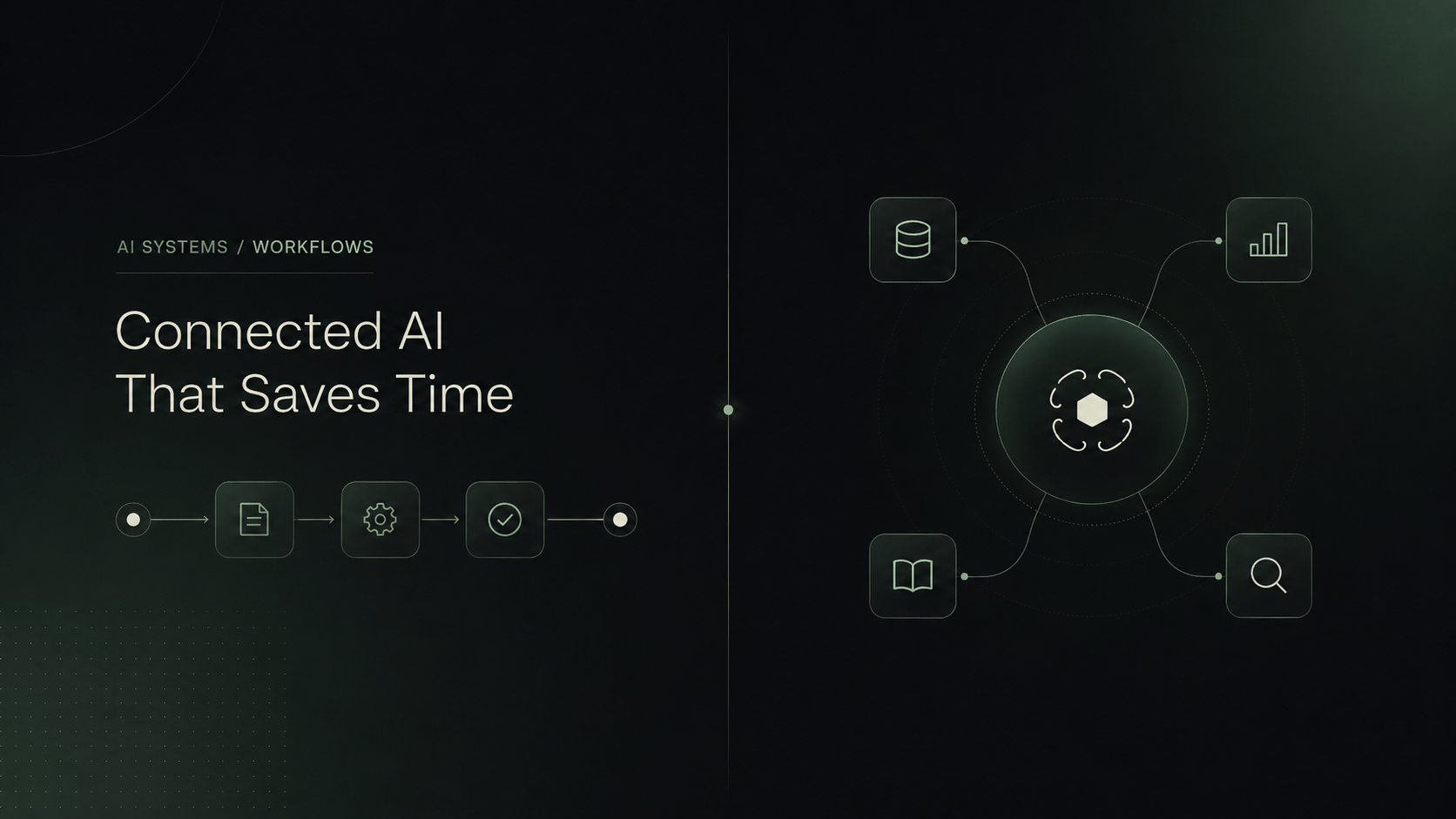
Traditional automation compared with a connected AI agent workflow

What Traditional Automation Is Good At

Traditional automation works best when a workflow is predictable. The trigger is known, the required fields are clear, and the action should happen the same way every time. In that kind of process, reliability matters more than interpretation.

Think about the operational tasks businesses already automate successfully: copying form data into a CRM, generating an invoice after payment, notifying the team when a status changes, moving a file after upload, or syncing fields between two systems. None of these steps need flexible reasoning. They need consistent execution.

That is why rule-based workflows are often the better choice for structured processes. They are easier to audit, simpler to test, and usually less expensive to maintain. If the input is stable and the expected outcome is obvious, an agent can add unnecessary complexity instead of value.

It also matters that traditional automation is easier to explain internally. When a team asks what happens after a payment is received or a form is submitted, the answer can be written down in a few direct steps. That clarity is useful for operations, training, troubleshooting, and accountability.

There is a tendency to underestimate how far a good deterministic workflow can go. Many business bottlenecks are not caused by a lack of intelligence. They are caused by a lack of consistency. If the process is already structured, the best improvement is often to make it run automatically and reliably, not to make it more adaptive than it needs to be.

  • inputs are predictable and already structured
  • the steps are known in advance
  • the decision is binary or tightly rule-based
  • exactly the same action should happen every time
  • low ambiguity matters more than flexibility

Where AI Agents Become Useful

AI agents start to make sense when the workflow cannot be reduced to a single fixed rule. They become useful when requests arrive in natural language, when the right next step depends on context, or when the system needs to select between different tools and actions.

A client message, a support email, a meeting reschedule request, or a messy supplier response often contains useful intent, but not in a perfectly structured format. Someone or something has to interpret it. That is the gap an agent can fill.

The important point is that an agent is not valuable because it sounds more advanced. It is valuable when it helps the system deal with ambiguity that rule-based automation struggles to handle on its own.

That ambiguity can show up in small ways or large ones. Sometimes it is just a vague time request, like "later this week." Sometimes it is a mixed request that combines sales, support, and scheduling in the same message. Sometimes it is a document that needs key details extracted before anything useful can happen. In each case, the system has to do more than follow a single hard-coded branch.

An agent is also useful when the process is conditional in a way that would otherwise create dozens of brittle rules. If the workflow depends on the language a customer used, the product they mentioned, the urgency implied in the message, the internal status of the account, and whether a team member is already handling the issue, the logic stops being simple. That does not automatically mean the whole workflow should become agentic, but it is a strong sign that an interpretation layer may help.

  • natural-language requests need interpretation
  • context changes from one request to the next
  • information must be extracted from messages or documents
  • the system may need to choose between multiple actions or tools
  • follow-up questions are required before continuing
  • the workflow needs to know when to hand off to a human

A Simple Comparison

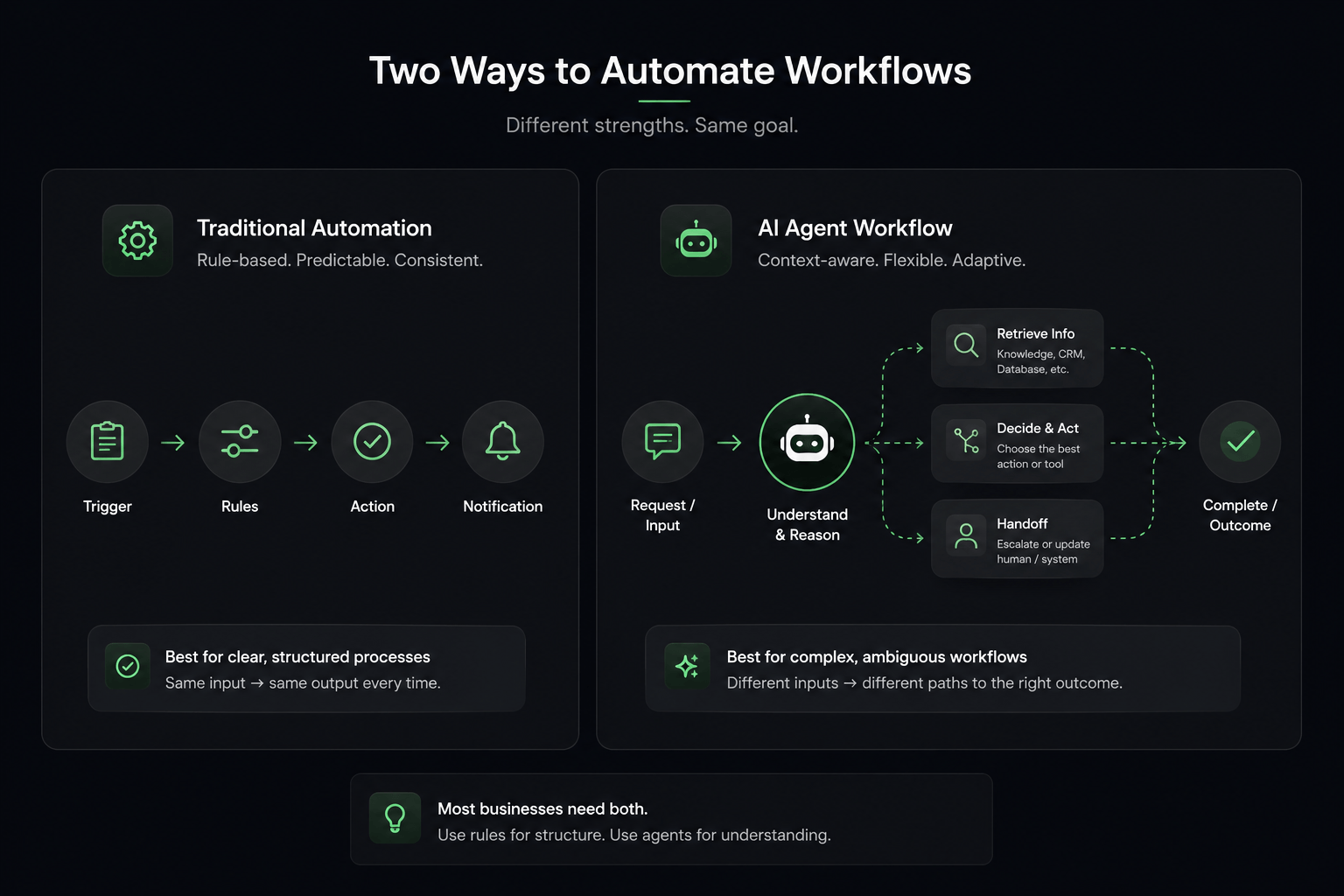
Traditional Automation

Trigger -> Rule -> Action

A defined input activates a known rule and produces a predictable outcome.

AI Agent

Request -> Understand Context -> Decide -> Use Tool -> Evaluate -> Continue or Handoff

The system interprets what the person means, chooses how to proceed, and then keeps the workflow moving.

This is the practical difference. Traditional automation follows a path. An AI agent helps determine which path fits the request before the deterministic steps take over.

That distinction matters because many businesses are not choosing between two completely separate systems. They are deciding where interpretation is needed and where precision is non-negotiable. Once you look at the workflow that way, the architecture becomes much easier to reason about.

Comparison between traditional automation and an AI agent workflow
Traditional automation follows known rules. AI agents help interpret context and choose the right path.

Example 1 - Lead Intake

Suppose a business has a simple contact form with fixed fields. A traditional workflow can create a CRM record, assign an owner, and send a confirmation immediately. That works well because the input is already structured. No interpretation is required.

Now compare that with a website visitor who writes a paragraph describing a problem, mentions a timeline, asks whether you handle a specific use case, and hints that they may already have spoken with someone on the team. That message is much less structured. An agent can interpret the request, ask one or two follow-up questions, categorize the inquiry, summarize it, and route it to the right person before the CRM update happens.

Both are valid systems. If the lead flow is mostly form-based and predictable, traditional automation is enough. If the intake process depends on understanding free-text requests, urgency, fit, or prior context, an agent becomes more useful.

A practical way to think about it is this: if the business already knows exactly which fields it needs and users reliably provide them in a consistent format, rules will probably carry most of the value. If the business first has to figure out what the person is actually asking for, the intake stage is no longer just data transfer. It includes interpretation.

Example 2 - Appointment Scheduling

Traditional scheduling is straightforward when the user picks a slot from a fixed booking page. The system records the choice and sends confirmations. That is a clear deterministic flow.

But a message like "Next Thursday afternoon works better" requires interpretation. The system needs to understand the requested time window, check actual availability, suggest options, confirm the user's choice, and then create the appointment.

An agent helps when the request arrives conversationally instead of through a structured form. Even then, the actual booking step should still be governed by deterministic rules so the final calendar action remains reliable.

This is also a good example of where businesses sometimes overbuild. They may not need an agent for the entire scheduling flow. They may only need an agent for the part where the request is understood, translated into a time range, and turned into structured options. After that, the scheduling logic can remain strict and predictable.

Example 3 - Customer Support

Traditional support automation is useful for clear, repeatable actions: send the reset link, route based on a menu option, or return a known answer to a known question. Those flows remain valuable because they are quick and predictable.

Support becomes more complex when the customer describes an issue in their own words, references an earlier conversation, or mixes several requests into one message. An agent can interpret the situation, retrieve the relevant knowledge, decide whether the issue can be resolved automatically, and escalate when it should not.

That does not mean an agent should replace humans for sensitive or high-risk cases. It means the system can handle the first layer of interpretation while still respecting boundaries around judgment, policy, and accountability.

In practice, this often means the agent is best used to classify, summarize, gather missing details, and prepare the next step rather than pretending it should resolve every issue end to end. For many support environments, that is where the highest leverage sits: fewer dead ends, better triage, and cleaner handoffs.

AI Agents Should Still Use Deterministic Automation

One of the most practical takeaways here is that strong systems usually combine both approaches rather than treating them as competitors.

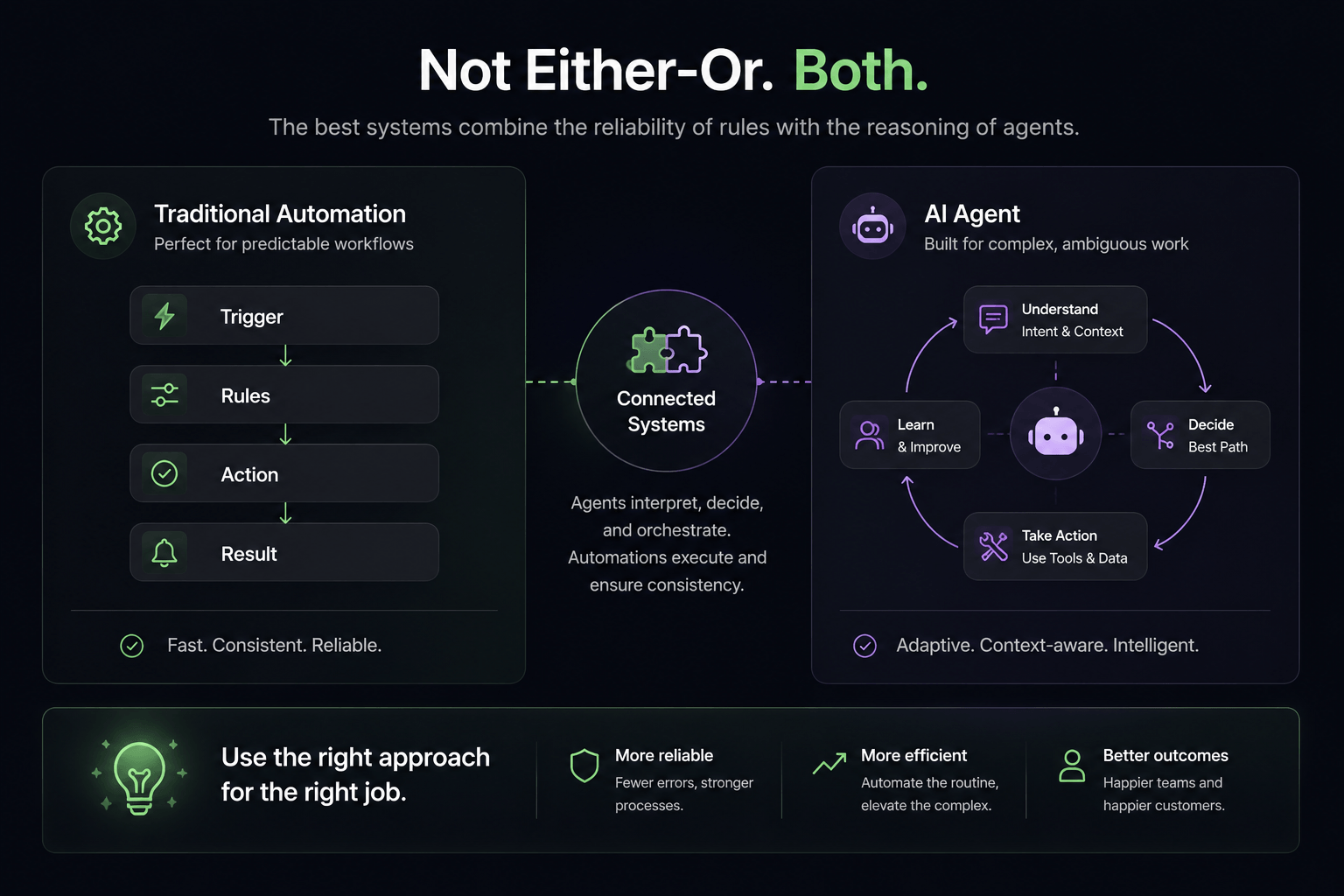
AI agents and traditional automation working together in one connected system
The strongest workflows often combine AI for interpretation with deterministic automation for reliable execution.

An agent may interpret a messy message, extract the key details, and decide which path fits. But once the path is chosen, the operational steps behind it should often remain deterministic.

For example, an agent can understand the request and determine that a qualified lead needs follow-up. After that, a structured workflow can create the CRM record, validate required fields, call an API, log activity, and send the right internal notification. Those parts should not be improvised every time.

The same pattern appears in scheduling, support, onboarding, and operations. The agent handles the ambiguity at the front of the process. The automation layer handles the predictable actions behind it.

This balance matters because businesses do not usually need more AI for its own sake. They need workflows that behave reliably. If the AI layer starts improvising the parts that should remain precise, the system gets harder to trust.

You can think of it as a separation of responsibilities. The agent is useful for understanding and choosing. The deterministic workflow is useful for executing and recording. When those responsibilities blur together, systems tend to become either too rigid to be helpful or too loose to be dependable.

That is why strong implementations usually define clear boundaries around what the agent is allowed to decide, what fields must be validated, which tools it can call, and which actions require human confirmation. The goal is not to make the AI behave like a magician. The goal is to make the workflow dependable enough for real operations.

How to Decide Which One You Need

A simple way to decide is to look at the workflow itself rather than the label attached to the technology. Ask what the input looks like, what decisions are required, and whether the next action should always be the same.

It helps to be specific. Saying "we want AI for lead handling" is usually too broad to be useful. A better question is whether lead handling means copying structured form data into a CRM, interpreting free-text inquiries, qualifying inbound demand, routing urgent opportunities, or scheduling follow-ups from natural-language requests. Each of those can point to a different solution.

Use Traditional Automation When

  • - the process is predictable
  • - rules are stable
  • - inputs are structured
  • - the same action should happen every time

Consider an Agent When

  • - input is conversational or unstructured
  • - multiple outcomes are possible
  • - context changes the correct next step
  • - the system must choose between tools or ask clarifying questions

Use Human Review When

  • - the decision is high-risk
  • - the information is sensitive
  • - judgment, accountability, or exception handling matters

That framework is intentionally simple, but it helps. Businesses often overcomplicate the decision because they start with the tool instead of the workflow.

Another useful test is to ask what would happen if the workflow made the wrong choice. If the outcome is easy to reverse, an agent may be acceptable with some guardrails. If the cost of a mistake is high, the deterministic part of the system needs to be stricter and human review may need to stay in the loop.

Start With the Workflow, Not the Technology

Before deciding whether AI is needed, map the workflow clearly. What triggers it? What input arrives? What decision has to be made? What action follows? What exceptions appear? When should a human take over?

Once those pieces are visible, the right architecture becomes easier to choose. Some flows are clearly deterministic. Some need interpretation at the front and structured execution behind it. Others should remain mostly human because the stakes are high.

That is a much more useful starting point than asking where AI can be added for appearance alone. The better question is which part of the workflow is currently blocked by ambiguity, repetition, or slow handoffs.

For many teams, this exercise also reveals that several painful workflows are actually a mix of both. A person sends something unstructured, the business needs to understand it, and then the backend steps are routine. That combination is exactly why the agent-versus-automation question should not be treated like a winner-takes-all decision.

Once you break the workflow into trigger, input, decision, action, exception, and handoff, the design choices become more grounded. You can place intelligence where it helps and keep rules where they protect reliability.

How Izenth AI Approaches It

Izenth AI focuses on practical connected systems, not on forcing an agent into every process. Some workflows are better served by straightforward automation. Others benefit from an AI layer that can understand requests, use business context, and coordinate the next action across tools.

The goal is not maximum novelty. It is choosing the least unnecessary complexity that still makes the workflow more useful.

Closing Thought

The best system is not the one with the most AI in it. It is the one that handles the workflow reliably with the least unnecessary complexity.

If you want to compare real implementation patterns, explore our Practical Demos, review our AI Services, or start a conversation about which workflows in your business should stay deterministic and which ones actually need an agent layer.